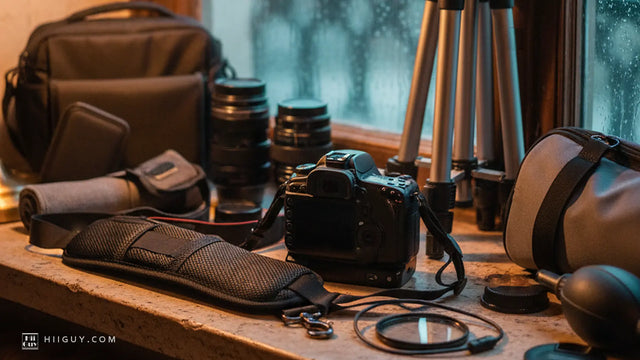
You have a strap open in one tab and your camera on the desk in front of you, and the only question that actually matters right now is whether the thing will physically attach. Not whether it is comfortable. Whether it goes on. Buying a canon camera strap is unusually safe in this respect, and almost nobody says so plainly, so here it is: if your body is an EOS, a Rebel, or an R-series mirrorless, the answer is almost certainly yes, and the reason is that Canon has used the same two attachment points for decades.
What follows is the fit question only. Not padding, not comfort, not which one we would buy. Just where a strap connects to a Canon, which Canon bodies differ, and the two situations where it genuinely does not go on.
Three ways a Canon camera strap attaches
There are exactly three, and every strap on the market uses one of them or a combination.
Through the eyelets. The two slots on the top corners of the body. This is the route the strap in your camera box uses.
Into the tripod socket. The threaded hole in the base plate. Sling and crossbody straps screw a mount into it and hang the camera from a single point.
Through a ring or an anchor fitted to the eyelets first. A small metal link, or a cord loop, that lives in the eyelet permanently and gives the strap something round to clip to.
Work out which of the three your strap uses before you order, because that is the whole compatibility question. Everything else is preference. We went through the two main routes in more detail in tripod socket or strap lugs, which is worth a read if you are choosing between a neck strap and a sling.
Route one: the eyelets, and why they are the safe bet
Canon calls them strap mount eyelets, and its own support instructions put them on the upper left and right sides of the camera. The published procedure is the same whether you are holding a Rebel, a 5D Mark IV or an EOS R: pass the end of the strap up through the eyelet from the bottom, fold it over and back through the strap keeper, run it through the inside of the buckle, pull the slack out, and check the webbing is not twisted before you do the other side.
Read that again and notice what is missing. No hardware. No sizes. No model numbers. It is friction and webbing, and the only dimension involved is whether your strap's end is narrow enough to pass through the slot.
On every Canon in this article it is. The eyelets on the Rebel line, the 5D series and the R bodies all take a standard strap end threaded straight through, which is why a thirty-year-old EOS strap still fits a camera bought last week. If you want the step-by-step with the fold, we wrote how to attach a camera strap as its own piece.
The one eyelet problem, and it is not a Canon problem
Thick cord anchors, the kind that loop through the eyelet and stay there, are the only thing that ever fights a strap mount. On some cameras the eyelet is a tight little slot and a thick cord will not pass through it twice. That is a complaint you hear about certain compact and rangefinder-style bodies, and the standard fix is a triangular split ring, which most manufacturers used to supply in the box.
It is worth knowing about. It is also not something Canon DSLR and R-series owners hit, which is the honest answer to the question rather than a hedge. If a strap you want uses cord anchors and you own a Rebel, an R6 Mark II or a 5D Mark IV, it will go on.
Route two: the tripod socket, and the hole everything wants
Single-point sling straps skip the eyelets and screw into the base of the camera instead. This is where fit genuinely can go wrong, though not for the reason people expect.
The thread itself is standardised. ISO 1222, the tripod connections standard, specifies a 1/4-20 UNC thread for cameras of this size, a quarter of an inch across, and every Canon body named here uses it. A screw mount sold for a Nikon fits a Canon, because it is not really a Canon part at all.
The problem is competition for the hole. One socket, and three things want it: your tripod plate, an L-bracket if you shoot verticals, and the strap's screw mount. If an Arca plate currently lives on the bottom of your 5D Mark IV, look at it before you order, because a plain screw mount means taking the plate off every time you go to the tripod. Some mounts solve this by threading through a plate with a pass-through socket. Many do not.
The second thing to check is clearance. On a body with a deep grip or an attached battery grip, the socket can sit close enough to the grip that a wide mount fouls it. Put a coin in the socket and look at what is around it.
What actually changes between a Rebel, an R6 Mark II and a 5D Mark IV
Not the attachment. The load.
The published specifications put a Rebel SL3 at 15.8 ounces and a Rebel T8i at 18.2 ounces. An EOS R6 Mark II comes in at 23.6 ounces, and a 5D Mark IV at 31.4 ounces, which is a shade under two pounds before you have put a lens on the front. That is double the SL3.
Every one of those bodies attaches to a strap identically. What differs is what happens three hours later, and it is the only part of this decision where the model name matters.
- Rebel SL3, T7, T8i. Light enough that almost anything works. A thin strap will still dig in with a telephoto on the front, but the body alone is not the problem.
- EOS R6 Mark II. The awkward middle. Light for a full-frame body, heavy enough that a narrow unpadded strap is noticeable by lunchtime, and usually paired with glass that weighs more than it does.
- EOS 5D Mark IV. Near two pounds bare. Width and padding stop being nice and start being the point, and a bare neck strap is the wrong tool.
If you own a Rebel specifically, we went deeper on the strap Canon packs in the box in the Canon Rebel T7 strap piece, including what its buckle cannot do.
Once it is attached, where the weight goes

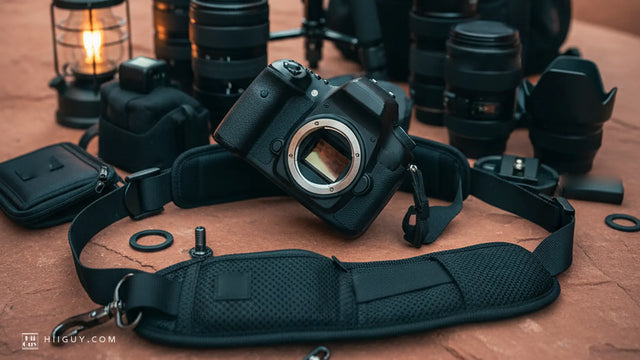
That is route two in use, and you can see the metal clip sitting under the camera rather than at the top corners. The body is free to turn and the pad is carrying the load on one shoulder instead of across the back of the neck.
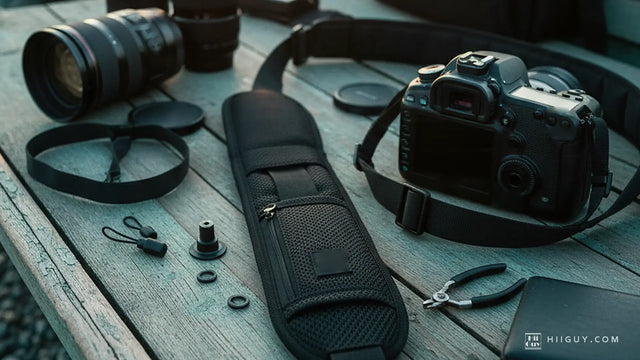
The HiiGuy strap is heavy-duty polyester webbing with a wide padded shoulder pad and a stainless steel quick release that screws into that 1/4-20 socket, plus a safety tether that runs up to a standard eyelet so the load has a second path. The tether is the part worth noting on a Canon, because it uses the attachment point the screw mount leaves empty rather than asking you to choose between the two. The box also includes a second screw mount, so a second body takes the same strap without unscrewing anything.
There are two variations and length is the only difference. The Regular adjusts up to 32 inches on the body and the XXL up to 44 inches, with the same webbing, pad, quick release and safety tether in both, so the choice is a measurement of you rather than of your Canon. HiiGuy has been making these in Los Angeles since 2016 and backs the HiiGuy strap for three full years. See it on Amazon.
Three things to check before you order
Sixty seconds with the camera in your hands settles all of it.
- Look at both eyelets. Confirm they are clear. A previous owner may have left split rings or a cord anchor in them, and that changes which straps clip straight on.
- Look at the tripod socket. If a plate or an L-bracket is already in there, decide now which one is going to live on the camera, because a screw mount and a tripod plate want the same quarter-inch hole.
- Weigh the decision with the lens on. A 5D Mark IV with a 70-200mm attached is a different carrying problem from the same body with a 50mm, and the strap has to suit the heavier of the two days.
The fit question has a boring answer, and boring is good news. Canon has not changed the two attachment points in a very long time, so what you are really choosing is where the weight sits and how wide the thing is that carries it. That part is worth thinking about. Whether it goes on is not.