The dial on top of your camera has maybe eight positions on it, and nobody ever tells you which order to learn them in. So most people leave it on the green square for a year, feel vaguely guilty about it, and read another article about camera modes explained that lists the letters without ever saying what to do on Saturday.
This is the chart, and then the part the charts leave out. Every definition below comes from a manufacturer's own manual, named where it is used. The last section is a four week plan for actually moving the dial, which is the only bit that changes your photographs.
One idea sits underneath all the letters
Every letter on the dial answers one question: who chooses the shutter speed, and who chooses the aperture. That is it. The camera and you split two decisions between you, and each mode is a different split.
| Mode | Nikon calls it | Canon calls it | You set | Camera sets |
|---|---|---|---|---|
| Auto | AUTO | A+ | Nothing | Everything, including whether it thinks the subject is moving |
| P | Programmed auto | Program AE | Nothing, but you can shift the pair | Shutter speed and aperture together |
| A / Av | Aperture-priority auto | Aperture-priority AE | Aperture | Shutter speed |
| S / Tv | Shutter-priority auto | Shutter-priority AE | Shutter speed | Aperture |
| M | Manual | Manual exposure | Both | Nothing |
Nikon and Canon disagree only about the labels. Canon uses Av for aperture value and Tv for time value, Nikon uses A and S, and the two cameras behave the same way. If you have shot one brand and picked up the other, that table is the whole translation.
Auto is doing more than you think, and less than you want
The green square is not a lazy setting. Canon's EOS R6 manual describes its A+ mode, Scene Intelligent Auto, as analyzing the scene and setting the optimum settings automatically, and says it will adjust focus on either a still or a moving subject by detecting the motion of the subject. It even says the mode makes colors look more impressive in nature, outdoor and sunset scenes.
The interesting part is the caution attached to it. The same manual warns that subject movement, meaning whether subjects are still or moving, may not be detected correctly for some subjects or shooting conditions. That single line is the honest case for learning the other letters. Auto is guessing what kind of picture you are taking, and it guesses from brightness and movement, not from intent. It cannot know that you want the background behind a portrait blurred out, or that you would rather have a sharp bird than a clean sky.
When Auto is the right answer
Handing the camera to someone else. A party indoors where you are in the photograph half the time. The first ten minutes with a body you have never held. There is nothing to prove by shooting a birthday in manual.
P is not Auto with a different badge
This is the most misread position on the dial. In P the camera still picks both numbers, so on the face of it nothing has changed. What changes is that you can argue with it.
Nikon calls this flexible program. Nikon's own D3500 guide explains that in mode P the camera adjusts shutter speed and aperture for optimal exposure, and that rotating the command dial gives you different combinations of the two. Canon calls the same thing program shift, and its EOS R6 manual says you can freely change the combination of shutter speed and aperture value set automatically by the camera while maintaining the same exposure, by pressing the shutter button halfway and then turning the main dial.
So P means: the camera makes a sensible first offer, and one thumb roll walks that offer toward a wider aperture or a faster shutter without changing the brightness of the picture. Two limits are worth knowing, both from Canon's manual. Program shift cancels itself when the metering timer ends, and it cannot be used with flash.
When P is the right answer
Walking around with no fixed subject. Street, markets, a day in a city where the next frame could be anything. You get a working exposure immediately and a way to nudge it when the frame turns out to want something specific.
A and Av: you choose how much is sharp
You set the aperture, the camera sets the shutter speed. Nikon's D3500 guide gives the one line summary better than anyone: use it to control background blur.
The failure mode is the thing to memorize, because the camera tells you about it and most beginners do not know what the warning looks like. Canon's manual for Av mode says that if 30 seconds blinks on the display the picture is underexposed, and the fix is to open the aperture, meaning a lower f-number, until the blinking stops, or raise the ISO. If 1/8000 blinks instead, the picture is overexposed, and you close the aperture down or lower the ISO.
In plain terms: a blinking number is the camera saying it has run out of room on its half of the deal. That happens in Av when you have asked for f/11 in a dark church, and the only honest answers are more light, more ISO, or a wider aperture.
When A or Av is the right answer
Most of the time, which is why experienced photographers leave the dial here. Portraits, landscapes, food, products, anything where the depth of the sharp zone is the decision and the shutter speed just has to be fast enough.
S and Tv: you choose what movement looks like
The mirror image. You set the shutter speed, the camera finds the aperture. Nikon's guide puts it as using the mode to emphasize motion, which is the right framing: this mode is for pictures where movement is the subject, not an inconvenience.
The warnings work the same way in reverse, and Canon's Tv page spells them out. If the lowest aperture value blinks, the shot is underexposed, and you set a slower shutter speed until it stops blinking or raise the ISO. If the highest aperture value blinks, the shot is overexposed, and you go to a faster shutter speed or drop the ISO.
There is a trap here that catches people who set the dial and forget it. Ask for 1/2000 on an overcast afternoon and the camera will open the lens as far as it goes, run out, and hand you a dark photograph while blinking a number you were not looking at. Shutter priority needs more attention than aperture priority, not less.
When S or Tv is the right answer
Sport, children, dogs, moving water, anything with wheels. Also the deliberate opposite: a slow speed on a tripod when you want the water smooth and the rocks sharp.
M, and the honest reason to use it
You choose both numbers. Nikon's D3500 guide adds the detail that manual mode even offers a shutter speed of bulb for long exposures, where the shutter stays open as long as you hold it.
Manual is not a skill level, it is a tool for situations where the meter is wrong or the light is not changing. A stage with a bright spotlight on a dark background fools every meter ever built. A studio with constant lights does not change between frames, so there is nothing for an automatic mode to react to. Both are manual's home ground.
Shooting a sunny park in manual, adjusting between every frame, is not more advanced than shooting it in Av. It is just slower.
The row every other chart leaves out: what to do this month
Knowing the letters changes nothing. Living on one of them for a week changes a lot. Here is the progression that works, and the rule is that you do not move to the next row until the current one feels boring.
| Week | Dial position | The one thing to practise | You are ready to move on when |
|---|---|---|---|
| 1 | P | Shift the program with your thumb on every third frame and watch which pair of numbers you keep choosing | You can predict which way to roll before you look |
| 2 | A / Av | Shoot the same subject at the widest aperture and at f/8, back to back, and compare at home | You choose the f-number before you raise the camera |
| 3 | S / Tv | One moving subject, photographed at 1/60, 1/250 and 1/1000 | You recognize a blinking aperture and know which way to turn the dial |
| 4 | M | One scene with fixed light, set by hand, then left alone for twenty frames | You can get a correct exposure without the meter panicking you |
After the fourth week, put the dial back on A or Av and leave it there. That is not a failure. It is where most working photographers spend most of their time, and you now understand what the other positions were doing, which is the actual point.
Once the mode makes sense, the next question is what numbers to reach for, and we put the starting points in one place in our settings by scenario chart. If you want something to shoot while you practise, our guide to camera angles with examples gives you twenty deliberate frames to go and take.
None of it happens if the camera is in a bag

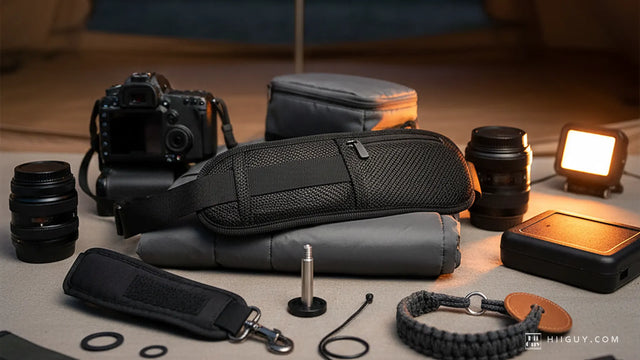
A four week plan needs the camera on you four weeks running, and the thing that quietly kills practice is a camera that is uncomfortable to carry for an afternoon. The HiiGuy camera strap holds the body at your hip on heavy-duty polyester webbing with a wide padded shoulder pad, so it is out of the way between frames and up at your eye in one movement, which is the position in the photograph above. It comes in two variations and length is the only difference: the Regular adjusts up to 32 in and the XXL adjusts up to 44 in. There is a stainless steel quick release for the weeks you are working on a tripod, and a safety tether behind it. HiiGuy has made it since 2016 and backs it for three full years.
The one paragraph version
Auto guesses. P guesses and lets you argue. A and Av mean you own the depth of field. S and Tv mean you own the motion. M means you own both and the camera stops helping. Start on P this week, move when it gets boring, and do not let anyone tell you the green square is shameful. The photograph nobody took because the dial was intimidating is worse than any of them.