The first hour of a wedding with two cameras feels like a superpower. A wide lens on one body, a long lens on the other, and you never miss the moment because you were twisting a lens off. By the speeches, the same arrangement feels like carrying shopping bags from your neck.
Nothing about the gear changed between those two hours. What changed is that the weight has been pulling on the same few square centimetres of you for six hours. The fix is rarely a lighter camera. It is moving the load somewhere that can take it.
This article contains an affiliate link to a harness sold by another brand on Amazon. If you buy through it, HiiGuy may earn a small commission at no extra cost to you.
How much you are actually carrying
It is worth doing the sum once, because most people underestimate it by half. Take a common two-body event kit, using the published specifications:
- Two EOS R6 Mark II bodies at approximately 670 g each with battery and card, per Canon's specifications.
- An RF 24-70mm f/2.8 lens at 900 g.
- An RF 70-200mm f/2.8 Z lens at 1,115 g.
That comes to roughly 3.4 kg, or about seven and a half pounds, before a flash, a spare battery or a bag. Swap in a mirrorless kit with smaller lenses and the number drops, but the problem does not disappear. It just arrives later in the day.
Notice where the weight sits in that list, too. The lenses outweigh the bodies. The 70-200 alone is heavier than either camera, which matters when you decide which body goes on which side.
Why two ordinary straps fail
The instinct is to put a normal strap on each camera and wear both. It works for about ten minutes. Then three things start happening at once.
The straps cross. Two straps worn over opposite shoulders meet in the middle of your chest and back. Every time you lift one camera, its strap drags across the other one, and they twist together.
The cameras meet. Hanging at the same height on the same side of your body, two bodies swing into each other when you walk. Lens hoods knock, screens scuff, and you start holding them apart with your elbows.
Your neck ends up doing the work. Straps worn around the neck put the entire load on one narrow line of pressure. Even worn over a shoulder, a thin strap concentrates the weight where it digs in, and on a moving body it keeps sliding back towards your neck.
None of this is a failure of the straps. They were each designed for one camera. Two bodies is a different job, and there are three honest ways to do it.
Option one: one camera across the body, one in the hand

This is the lightest-touch solution and the one most photographers already half-use. The heavier combination, usually the long lens, goes on a strap worn crossbody. The lighter body stays in your hand or on a wrist strap, and goes back in the bag during quiet stretches.
The photograph above shows why the crossbody half works. The strap runs from one shoulder to the opposite hip, so it cannot slide off, and the telephoto hangs muzzle down at the hip instead of bouncing against the ribs. Her hand rests on the strap out of habit, not because it needs holding.
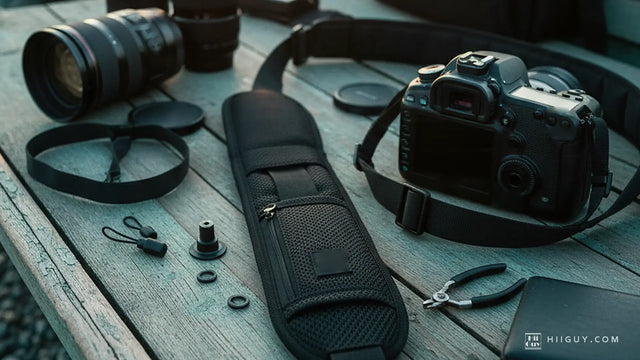
For this to be comfortable over a day, the strap has to be long enough to let the camera sit at the hip rather than under your arm, and it has to spread the load. The HiiGuy strap is built for exactly that carry. It is made from heavy-duty polyester webbing with a wide padded shoulder pad, and it attaches through a stainless steel quick release, so the heavy body comes off in one movement when you set it on a tripod or hand it over. A safety tether sits behind the release as a second connection.
It comes as two variations that are identical except for length. The Regular adjusts up to 32 inches on the body, and the XXL adjusts up to 44 inches for taller and broader photographers, which is also useful if you shoot in a jacket. If you are not sure which one you need, this guide to strap length for bigger builds walks through it. HiiGuy has made the strap since 2016 and backs it for three full years.
Best for: shoots where the second body is used occasionally, travel days, and anyone who does not want to wear a harness.
Option two: a dual harness
When both cameras are working constantly, the only arrangement that genuinely solves it is a harness. Instead of two independent straps, a harness joins the load across both shoulders and ties it together behind you. Each camera hangs at its own hip, on its own side, and they cannot meet.
The difference you feel is balance. With one crossbody strap, all the weight pulls one way and your body leans against it without you noticing. With a harness, the left and right loads cancel out, so you stand straight and your shoulders share the work.
The dual camera harness in our catalogue is leather with a satin lining and metal fittings, and it is sold by another brand through its Amazon listing. Before you buy any harness, check two things: whether it adjusts to your chest size with a jacket on, and how the cameras attach. Many harnesses mount through the tripod socket, which means removing a plate before you can put the camera on a tripod.
The honest downside is that a harness is committed gear. It takes a minute to put on, it looks like equipment rather than clothing, and it is excessive for a single camera.
Best for: weddings, events, press and sport, where both focal lengths are used all day.
Option three: split the carry between strap and belt
A third route is mixing methods. One body goes on a crossbody strap, the other clips to a belt or hip plate. It is the same idea as the hip belt on a hiking rucksack: the second camera stops hanging from your shoulders altogether, so they only carry one.
The trade is reach and bulk. A camera on the hip takes a longer movement to bring to your eye, and it catches on chair backs, car doors and crowds. It works best outdoors, and less well in a packed room.
Best for: outdoor events, hiking with two bodies, and photographers already wearing a belt system for lenses.
Which body goes where
Whichever option you pick, the same small decisions make the difference by late afternoon:
- Heavier lens on the side you shoot with. The long lens is the one you raise most carefully, so hang it on the side your hand naturally goes to first.
- Lens pointing down. A camera hanging muzzle down swings less and is less likely to catch the front element on a door frame.
- Length set with the jacket on. Adjust the strap for what you are wearing on the day, not what you wore when you bought it. A camera that sits at the hip in a T-shirt ends up under your arm over a coat.
- Put one body down when you can. During the meal, the speeches or a long walk between locations, a camera on the table carries nothing. A quick release makes that a two-second habit instead of a chore.
- Keep a hand option. A hand strap on the lighter body means it can come out of the bag and stay secure without adding anything to your shoulders.
The short version
If your second camera is a backup you pick up now and then, wear the main body on a long, padded strap across your body and keep the second one in hand or in the bag. If both cameras are working from start to finish, a harness is the only arrangement that balances the load properly. And if you are outdoors with a belt already on, moving one body to your hip takes real weight off your shoulders.
For more on matching a strap to the way you shoot, read how to choose the right camera strap for your photography style. Then try your setup at home with both cameras on for an hour before the next job. It is much easier to fix a strap length in the living room than halfway through a reception.